PRACTICAL MONEY MANAGEMENT
Building a Sustainable Household Budget: Why Tracking Stops and How to Design It Better
The purpose of household budgeting is not detailed recordkeeping, but being able to decide what to buy or pay next. This guide sets out a way to spot insufficient funds and overspending early while keeping data entry manageable.
The system matters more than willpower
A common reason budget tracking stops is expecting a finished system from the outset. If food spending is divided into dining out, groceries, snacks, and drinks, and every receipt item is entered separately, even five-minute sessions become a repeated weekly task. After a few missed days, the backlog makes restarting harder. Household budgeting does not require the precision of formal accounting records. It is enough to know how much remains available this month and whether the balance will cover the next automatic payment.
First, identify one point where tracking stopped. A large number of receipts, confusion between card purchase and payment dates, and delayed reports of family spending each call for a different response. If the cause is reduced to personal laziness, it is easy to choose a counterproductive measure such as adding more fields.
A minimal setup uses three figures
For the first month, divide finances into three figures: take-home income, expenses that are largely fixed each month, and expenses that vary day to day. Fixed expenses include rent, communications, insurance, and subscriptions. Begin variable expenses with four broad categories: food, household goods, transport, and leisure. If a purchase is difficult to classify, place it under its largest use and do not spend time correcting it later.
- On the day after payday, record the balance that is actually available, such as the balance in a checking or savings account.
- Subtract fixed expenses and scheduled card payments due before the next payday.
- Subtract planned savings from the remainder to find the amount available for variable expenses.
- Divide that amount by the number of weeks remaining to set a weekly guideline.
For example, if ¥80,000 is available and payday is four weeks away, the guideline is ¥20,000 per week. Checking the remainder every Sunday allows an adjustment in the third week, instead of waiting until month-end to review everything. If the weekly limit is exceeded, do not cut food excessively. Specify where the change will be made, such as reducing the following week's leisure budget by ¥3,000.
Set entry rules in advance
Fix the time and duration
Tracking does not have to be daily. Match the schedule to the payment method: two minutes a day for someone who often uses cash, or ten minutes twice a week for someone who mainly uses cards. Tie it to an action, such as after dinner on Wednesday and Sunday, rather than doing it whenever there is time. Even if two weeks of entries have accumulated, enter only the most recent seven days when restarting and combine the earlier period into one adjustment entry. Returning to current decisions takes priority over filling every gap.
Set amount thresholds
If small payments create too much work, combine all payments under ¥500 for a day as petty expenses. For purchases of ¥10,000 or more, keep a category and note. Large expenses inform decisions for the following month, while the total alone is enough to show a pattern in small expenses. If the cash balance does not match, record the difference and continue instead of spending thirty minutes looking for a discrepancy of a few hundred yen.
Adjust the budget gradually from actual spending
Starting with an ideal budget can create a large gap from reality. Measure actual spending without cuts for the first month, then reduce only one category by 5–10% the next month. If food spending is ¥60,000, try ¥57,000 rather than immediately setting it to ¥40,000. If that target is not met, translate the amount into an action, such as reducing relatively expensive restaurant meals from four times a month to three.
Annual insurance premiums, taxes, and appliance replacements are easy to omit from a monthly budget. For an annual cost of ¥120,000, set aside ¥10,000 each month as an unavailable balance. Even if an expense appears sudden, it is a planned expense when its timing and approximate amount can be anticipated.
Using ASSET MANAGEMENT
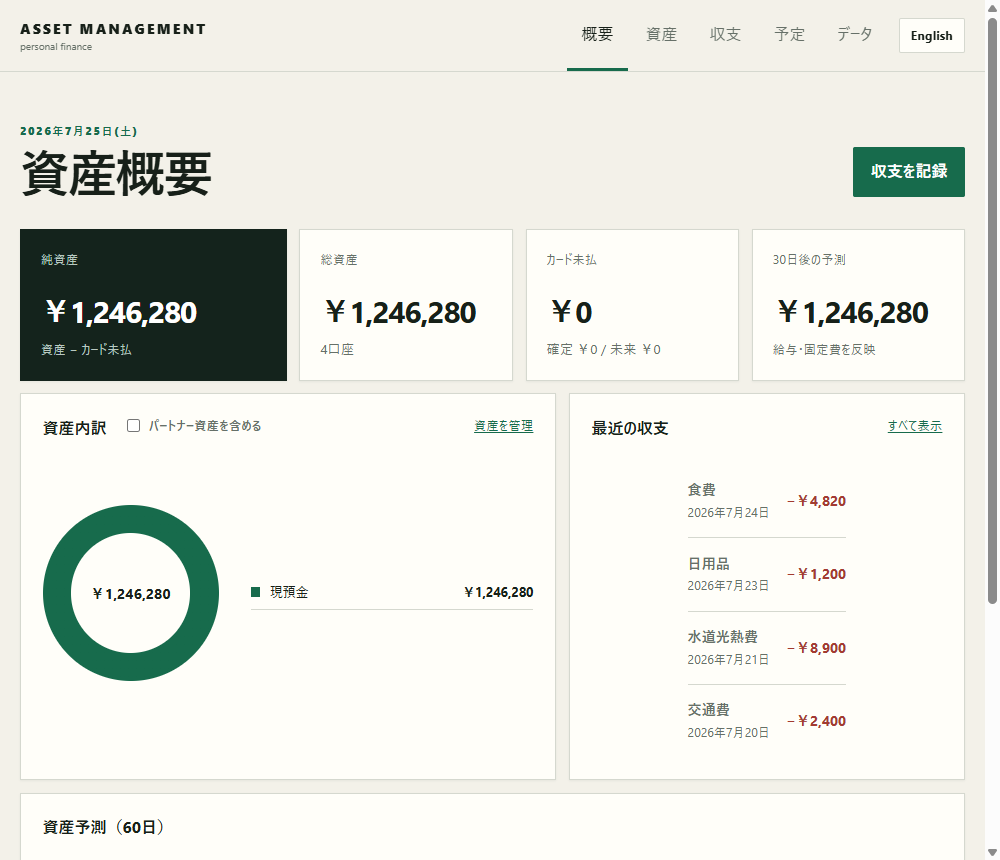
ASSET MANAGEMENT can record account balances, income and expenses, card charges and repayments, and scheduled salary and fixed expenses. It also provides a simple forecast for thirty days ahead. There is no need to transfer the full transaction history at the start. Register the current account balance and enter only salary, rent, utilities, and outstanding card payments due in the next thirty days to begin by checking for a potential shortfall.
Entries are saved on operator-managed Cloudflare D1 (a server). They are tied to an anonymous account issued automatically on first save and linked via a cookie, so they do not sync automatically to another device or browser. See ASSET MANAGEMENT Features and Storage for the full storage model. Also export a JSON backup at the end of each month and store it with a year and month in the name, such as "household-budget_2026-07." The file contains entries in plain text, so do not place it in a shared folder or on a public device. Do not enter card numbers, PINs, account numbers, or passwords.
Review only three items at month-end
- Whether fixed expenses include a service that is no longer used.
- Which variable expense category increased substantially from the previous month.
- Whether the balance can cover large payments due within the next thirty days.
Limit improvements to one each month. Record them as specific actions: review the mobile plan, reduce convenience-store visits from three times a week to two, or transfer ¥5,000 toward an annual payment. Sustainable management means maintaining a state in which the next action is clear, not completing a perfectly neat budget ledger.
Related links
- Use ASSET MANAGEMENT
- ASSET MANAGEMENT features and storage model
- Development notes: A local-first design that does not transmit personal data
About this article
Written by rin0420, the developer of the games and tools published on this site. The screenshots and figures shown here were captured from the live versions by using them directly.
Published July 14, 2026 / Last updated July 27, 2026 (updated the storage description for ASSET MANAGEMENT's server migration)