DEVELOPMENT NOTE
Development Note: Local-First Design Without Sending Personal Data Externally
For small web tools that handle personal data such as household finances and food inventory, I chose to store data in the browser rather than on a server. This note explains that decision and the limitations that should be communicated to users.
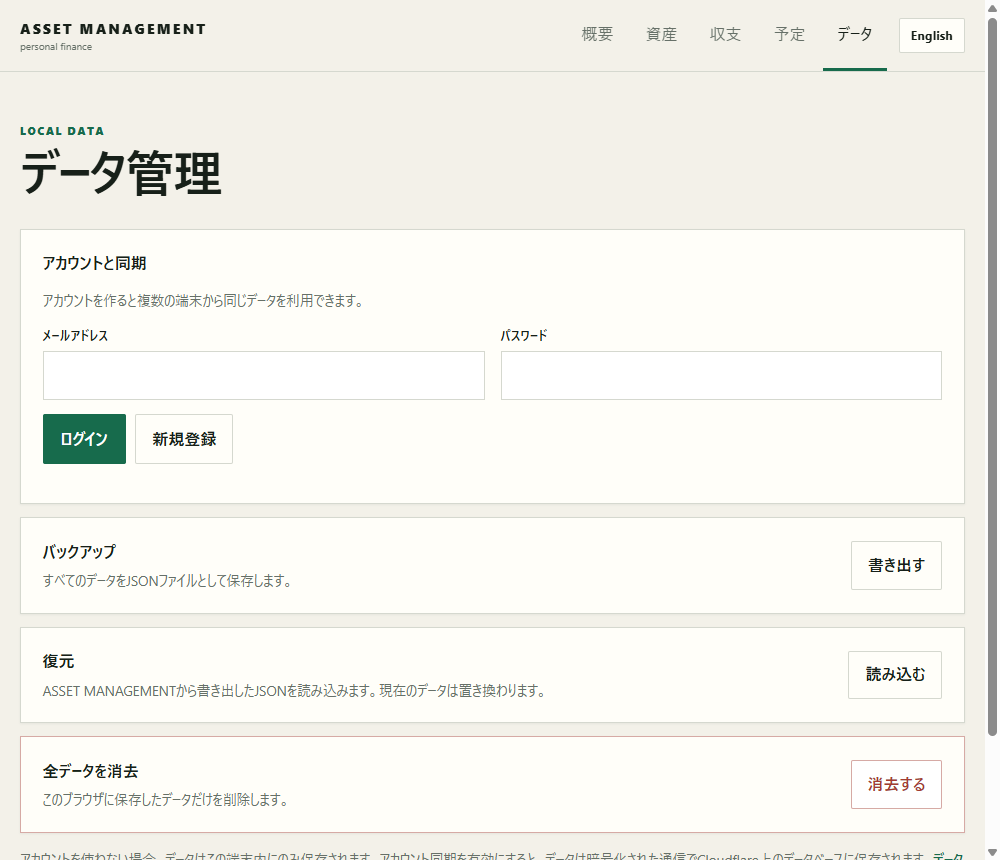
Update (July 27, 2026): The body of this article is a record of the design decision made when it was written (July 14, 2026). Since then, PANTRY moved its data of record from Local Storage to operator-managed Cloudflare D1 (a server) around July 17, 2026, and ASSET MANAGEMENT did the same around July 26, 2026. For the current storage location, see ASSET MANAGEMENT Features and Storage and PANTRY Features and Storage. The text below remains as a record of why Local Storage was chosen and the precautions communicated to users at the time, before that migration.
The scope of the local-first approach
Here, local-first means a structure that saves entered data in the browser in use and does not send it to an external server during normal use. At the time this article was written, ASSET MANAGEMENT handled account balances, income and expenses, card use, and plans, and PANTRY handled food names, quantities, storage locations, expiration dates, and similar information. Neither assumed account registration or cloud synchronization.
The web application itself was loaded from its distribution source, but at the time content entered by the user remained in Local Storage. Because people may assume that data from a web application also resides on the operator's server, clearly stating the storage location, whether communication occurs, and the conditions for deletion on the introduction page was part of the design. That policy of clear disclosure has not changed now that storage has moved to a server.
Balancing the approach with the feature set
Storing data on a server requires login, identity verification, encrypted communication, access control, database backups, deletion when an account is closed, and other measures. These are useful for synchronization across devices and collaborative editing, but at the time I judged that they would impose a substantial operational burden on a small record-keeping tool used by one person on one device.
Local Storage was chosen at that point because data could be saved on the device immediately after entry, without creating a server-side repository for personal data. No account or password was needed. It was less affected by network conditions, and records remained available in the same browser after the page was reloaded. This simplicity, however, did not mean cloud-equivalent security or permanent storage.
Benefits of not sending data externally (the reasoning at the time)
The benefits expected when Local Storage was chosen were as follows.
- Entered data does not accumulate with the operator, so there is no server-side collection that could be exposed at once.
- No additional email address or password is collected for registration.
- Each entry does not have to wait for a network response, helping the interface remain responsive.
- The storage mechanism can be explained simply as “in this browser.”
Household finance data in particular can reveal aspects of a person's circumstances from balances and spending alone. The idea that a feature should not receive data it does not need, rather than collecting it because doing so is convenient, still holds. ASSET MANAGEMENT has never contained advertising or access analytics, and that has not changed. However, the scope of its Content Security Policy has changed along with the move to server storage, from prohibiting external communication altogether to prohibiting communication with anything other than its own server. PANTRY likewise still keeps its data on an independent origin, separate from other Hub works.
Limitations of Local Storage (precautions communicated to users at the time)
The rest of this section covers precautions communicated to users while Local Storage was the data of record. Precautions relevant to the current server-based storage are covered in the FAQ on each tool's detail page.
No synchronization between devices
Records entered on a computer do not automatically appear on a smartphone. Even on the same device, Chrome and Edge, or a regular profile and a separate profile, have different storage areas. It is not suited to simultaneous sharing with family members. To use the same records on multiple devices, JSON must be exported and moved explicitly.
Clearing site data removes it
Records may be lost when browser data is cleared, site data is deleted, a profile is reset, or a device fails. The operator has no copy and cannot restore them in response to an inquiry. Records whose loss would cause a problem need a backup kept by the user.
Visible to others who use the same browser
Local Storage is not an encrypted vault. Someone who can open the same browser profile on a shared computer may be able to view records through the application. Users are told not to enter authentication information such as card numbers, PINs, account numbers, or passwords.
Making backup part of the feature set
When using Local Storage, provide export and restoration together. ASSET MANAGEMENT and PANTRY support exporting and restoring JSON backups, and PANTRY validates the format on import. Including the tool name and date in the filename makes it easier to identify the newest file.
- Export JSON at the end of the month or after a substantial update.
- Copy it to storage that only you use and that is separate from the current device.
- After restoration, compare the record count and two or three representative entries.
- Before discarding an old backup, confirm that the newest file can be opened.
JSON is easy for machines to handle, but stores entered content as plain text. Avoid shared folders with public links, common storage at work or school, and indefinite attachment to email. Even when storing an encrypted file, users need to choose a method suited to their environment, such as keeping decryption information in a different location.
Designing data separation
Browser storage is separated by origin. PANTRY is published on an independent Cloudflare Worker domain to create a boundary that prevents food data from being shared with other Hub works. This also makes it easier to preserve a structure in which unrelated applications cannot access the same stored data as features are added.
On the other hand, previously stored data does not move automatically when the origin changes. A public URL cannot be changed casually because it affects data migration. An update that changes the format of storage keys also requires either migration logic that reads existing data or a procedure that uses a backup.
Being clear about unsuitable uses
This structure is not suited to uses that require collaborative editing by several people, continuous synchronization across devices, remote invalidation when a device is lost, or a strict audit trail. A design that handles high-impact data such as medical or authentication information with simple Local Storage alone should also be avoided.
Local-first is not a term for asserting that something is safe because it does not use a server. The benefit of not collecting data and the responsibility for protecting it on the device should be explained separately, with backup guidance and cautions about shared devices placed where users can reach them from the actual interface. This design aims to let users choose a tool after understanding where their data is stored.
Related links
- ASSET MANAGEMENT Features and Storage
- PANTRY Features and Storage
- Inventory Practices for Reducing Food Waste
About this article
Written by rin0420, the developer of the games and tools published on this site. The screenshots and figures shown here were captured from the live versions by using them directly.
Published July 14, 2026 / Last updated July 27, 2026 (added a note on the ASSET MANAGEMENT and PANTRY server migration)