PRACTICAL FOOD INVENTORY
Food Inventory Management to Reduce Waste: Working with Best-Before Dates
Food is often discarded not because of the date itself, but because its presence is forgotten or the order in which to use it is unclear. This guide sets up inventory management that supports meal planning and shopping without requiring a perfect record of every item.
Begin with a limited scope
Registering everything from refrigerated condiments to dried goods at once makes the initial setup tiring. Start with foods that are easy to waste: opened dairy products, tofu and meat, prepared dishes, partly used vegetables, and foods whose freezing date is easily forgotten. Rice and salt can wait because they keep for a long time at room temperature and their remaining quantity is usually visible.
Set aside only fifteen minutes and inspect the refrigerator from the top shelf downward. There is no need to take every item out and place it on a table. If there are several of the same item, group them near the front, with older items ahead of newer ones. This rearrangement alone makes it possible to use older food first without opening the inventory record.
Use date labels as information for a decision
A best-before date indicates the period during which food is expected to retain its quality. A use-by date indicates the period during which food is expected to remain safe and is generally shown on perishable products. Both assume that the stated storage instructions have been followed and the package remains unopened. After opening, use the food promptly rather than relying on the printed date alone.
Do not apply a blanket rule of discarding every item past its best-before date, or eating an item past its use-by date based only on its appearance. Consider the product label, storage temperature, opening date, smell, and appearance together. If there are safety concerns about meat, fish, or prepared dishes, avoiding consumption takes priority. Inventory management does not guarantee safety; it helps find food before a decision is delayed.
Turn dates into action by choosing when to use each item
A list of dates alone does not decide a meal plan. Assign a day and a form of dish to food nearing its date: tofu due by Tuesday for Monday's miso soup, pork due by Thursday for a Wednesday stir-fry, or ripe bananas for breakfast. If naming a specific dish is difficult, a purpose such as main dish, soup, or breakfast is enough.
- Twice a week, select three refrigerated items approaching their dates.
- Gather items to be used within three days in one place at eye level.
- Plan only the meals that will use the three selected items.
- Before shopping, check the stock in the same categories.
The focus is limited to three items because trying to build the entire meal plan around inventory adds work. Before the date arrives, change the form of storage by cutting and freezing vegetables that cannot be finished, or dividing bread into portions for individual meals. After freezing, do not continue using the original date unchanged. Note the freezing date to avoid leaving the food for too long.
Keep quantity tracking simple
Track easily counted items by number, such as ten eggs or four containers of yogurt. For soy sauce, flour, frozen vegetables, and other items whose exact remainder is difficult to measure, three levels—unopened, half, and a small amount—are enough. A system that requires measuring at every entry will stop being updated.
Recording the opening date is useful for foods whose condition after opening matters more than the printed date. Keep only short information needed for the next action in the notes, such as "opened 7/14," "for cooking," or "half frozen." Record the store and price only when there is a separate purpose of comparing prices.
A workflow for managing stock with PANTRY
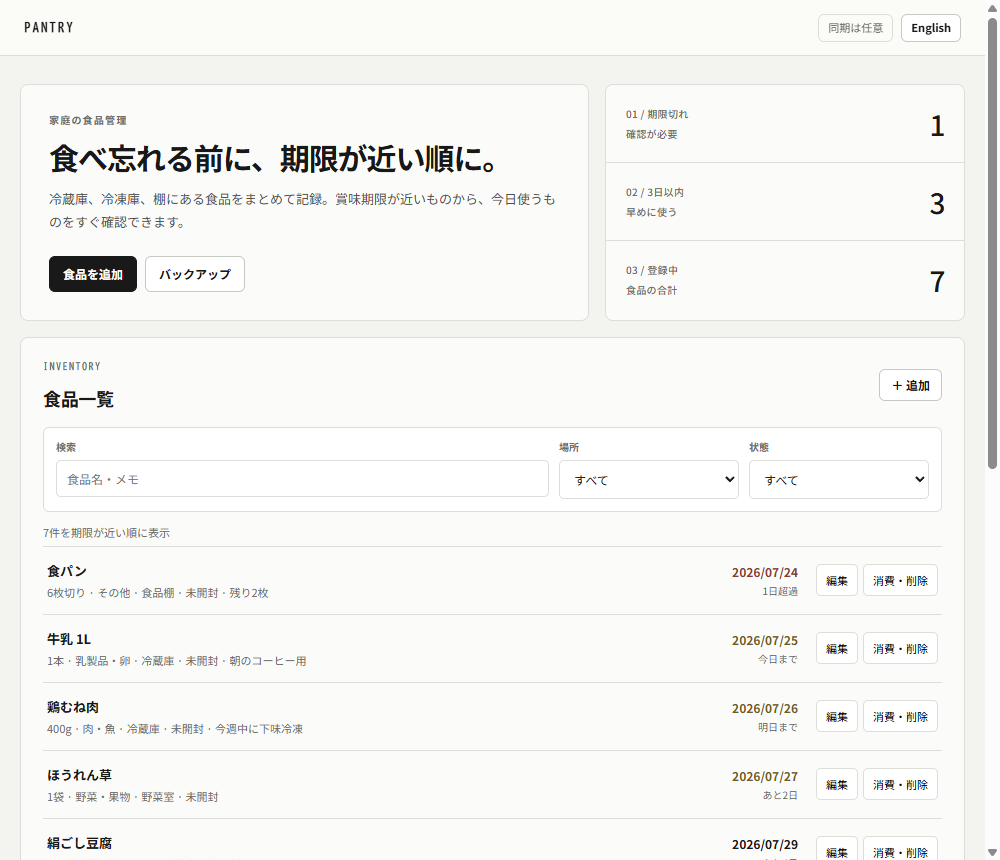
PANTRY can record a food name, quantity, category, storage location, date, opened status, and notes. Dates are automatically classified as expired, within three days, four or more days away, or no date. Begin by registering ten to twenty items from the refrigerator and freezer that are easy to waste, then add pantry shelves after the routine has continued.
A three-minute check before shopping
- Filter the storage location to the refrigerator and review items by nearest date.
- Search for foods on the shopping list and check for duplicates.
- Use "Consume" to remove finished items from the list.
If the list and the actual stock differ, treat the physical stock as correct and edit the list immediately. Forgetting an update is not a failure; the system is working if it can be corrected before shopping. A simple signal, such as leaving a note when someone opens the last item, is more sustainable than requiring every family member to enter data.
Stored data and backups
PANTRY food data is stored on operator-managed Cloudflare D1 (a server). It is tied to an anonymous account issued automatically on first access and linked via a cookie, so it is not shared automatically with a different browser or profile, even on the same device. See PANTRY Features and Storage for the full storage model.
To prepare for a loss of server connectivity or the automatic deletion of an anonymous account, export a JSON backup in any month when the records are substantially updated. The restore function validates the input format, but the backup itself should not be given to another person. Before changing devices, export it on the old device. After restoring it on the new device, compare the item count and several items with approaching dates.
A ten-minute weekly inventory is enough
On a fixed day each week, check only three items approaching their dates, opened items, and older items in the freezer. At month-end, it is enough to add a check of condiments and dried goods. If food was discarded, record its name and the reason in one line. If "could not finish the large size" occurs twice, choose a smaller package; if an item was hidden at the back, change its location. A waste record is not for assigning guilt, but for adjusting the quantity of the next purchase.
Related links
- Use PANTRY
- PANTRY features and storage model
- Development notes: A local-first design that does not transmit personal data
About this article
Written by rin0420, the developer of the games and tools published on this site. The screenshots and figures shown here were captured from the live versions by using them directly.
Published July 14, 2026 / Last updated July 27, 2026 (updated the storage description for PANTRY's server migration)